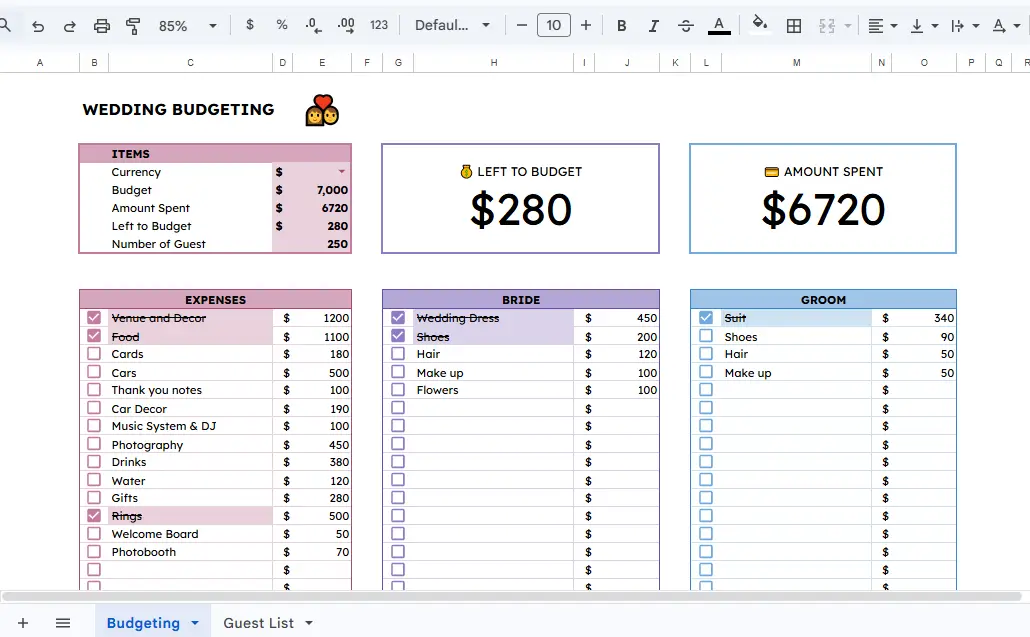
I created a free Wedding Budgeting Template in Google Sheets to help you plan your wedding smoothly.
Here is what it does and its benefits.
Planning a wedding is one of the most exciting times of your life, but it can also be one of the most overwhelming.
Between choosing a venue, finding the perfect attire, and managing an ever-growing guest list, the logistics can quickly become a source of stress.
One of the biggest challenges couples face is staying on top of their finances.
Without a clear plan, small costs can add up, leading to unexpected financial strain.
That is why I designed this Wedding Budgeting spreadsheet, to give you a clear, organized, and stress-free way to manage your finances for the big day.
What This Spreadsheet Does
The Wedding Budget is divided into two primary sections: Budgeting and the Guest List.
Budgeting: The budgeting section is the heart of the tool. It provides a high-level overview of your financial health, showing your total budget, the amount spent so far, and exactly how much you have left to allocate.
The template breaks down costs into three main categories:
General Expenses: This includes heavy hitters like Venue and Decor, Food, Cake, Photography, the Music System, etc.
Bride’s Expenses: Dedicated tracking for the bride’s needs, eg, Wedding Dress, Shoes, Hair, Makeup, etc.
Groom’s Expenses: Tracking for the groom’s needs, eg, Suit, Shoes, and other personal grooming needs.
Organized Guest List: Keeping track of who is coming is just as important as the budget.
The Guest List tab allows you to log names, contact information, and the status of their invitation.
This ensures you have a central hub for all guest-related data, preventing the common mistake of losing a contact number or forgetting to send a follow-up.
Benefits of Using This Template
Financial Clarity: By seeing your “Left to Budget” amount in real-time, you can make informed decisions about whether to splurge on that extra floral arrangement or scale back on drinks.
Centralized Information: Instead of having notes scattered across different apps and physical notebooks, everything from your rings to your photobooth costs is in one place.
Customization: While the template comes with pre-filled categories like “Welcome Board” and “Car Decor,” it is fully customizable to fit your specific cultural traditions or personal preferences.
Accessibility: Since it is built in Google Sheets, you and your partner can access and update the planner from your phones or laptops at any time, ensuring you are always on the same page.
How to Use the Spreadsheet
Using the template is straightforward:
Set Your Total Budget: Enter your maximum spend in the “Budget” cell.
Input Your Guest Count: Enter your expected number of guests to help gauge per-head costs.
Log Your Expenses: As you book vendors, enter the costs in the respective columns. The spreadsheet will automatically update your totals.
Manage the Guest List: Populate the names and contact details as you finalize your list.
How to Make Your Own Copy
To start using this template for your own wedding, follow these simple steps:
- Open the Wedding Planner Spreadsheet.
- In the top menu, click on File.
- Select Make a copy.
- Rename the file (e.g., “[Your Name]’s Wedding Planner”) and save it to your Google Drive.
Once you have your own copy, you can delete the sample data and start inputting your own details.
Happy planning!