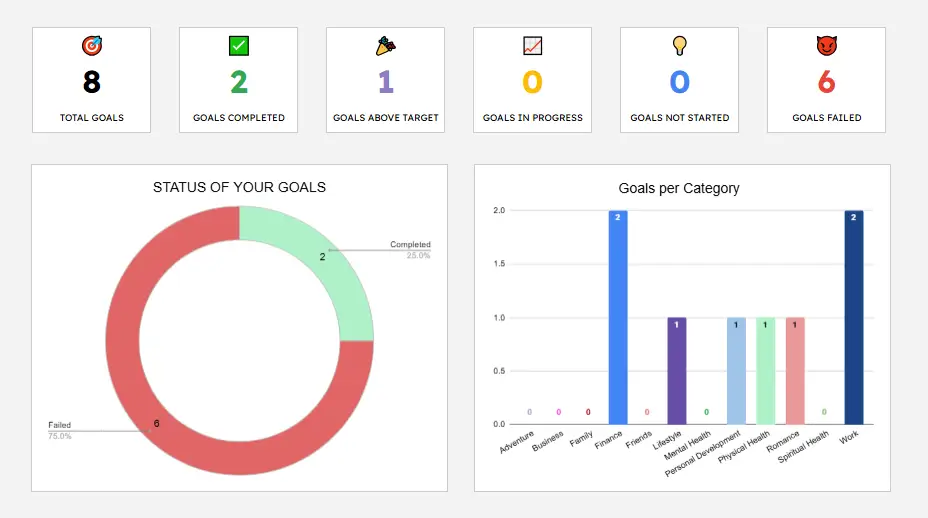
I made an easy to use Google Sheets template designed to help you stay organized and motivated on your journey toward personal and professional success.
This template goes beyond simple list-making, offering a dynamic way to visualize progress across all areas of your life.
Key Benefits
Holistic Approach
The template includes twelve pre-defined categories such as Finance, Work, Mental Health, Physical Health, and Personal Development, ensuring you maintain a balanced life.
Real-Time Progress Visualization
With built-in progress bars and status indicators (e.g., "In Progress," "Completed," "Above Target"), you can see exactly where you stand with a single glance.
Deadlines and Accountability
The template automatically calculates the days remaining until your deadline and flags when a deadline has passed, helping you stay on track.
In-Depth Reflection
Each goal entry includes a section for "Why This Goal," allowing you to document your motivation and reflect on your progress.
How to Use the Template
The Ultimate Goal Tracker is organized into several functional tabs, making it easy to manage complex objectives:
Dashboard
This tab provides a high-level overview of your total goals, goals completed, and overall success rate across different categories.
Goals Data
This is your primary workspace. Here, you enter your goal description, target value, actual progress, deadline, and category. The template automatically populates formulas for progress percentages and status updates.
Goal & Category Summaries
These tabs allow you to drill down into specific goals or categories for a more detailed look at your performance.
Instructions
Always refer back to this tab if you're unsure how to proceed.
To get started, simply enter your data in the white columns (Description, Target, Actual, Deadline, Category). Avoid editing cells with formulas to ensure the automation continues to work correctly.
Get Your Own Copy
Ready to take control of your goals? You can access the template here: Ultimate Goal Tracker.
Instructions to Make a Copy:
- 1Open the link provided above.
- 2In the top menu, go to File.
- 3Select Make a copy from the dropdown menu.
- 4Rename your new file and choose where to save it in your Google Drive. You now have a fully editable version of the tracker to call your own!